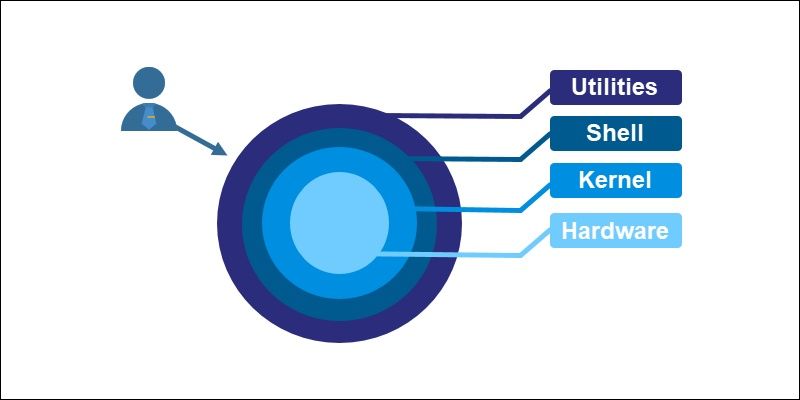
A shell environment is a software interface that allows users to interact with an operating system using commands. Instead of relying only on graphical interfaces, a shell provides direct control over system processes, files, and applications through a command-line interface (CLI).
Shell environments were created to make computing more efficient and flexible. Early computer systems had limited graphical capabilities, so command-based interaction became the standard. Even today, shells remain essential because they allow automation, scripting, and advanced system management.
Common shell environments include:
-
Bash (Bourne Again Shell)
-
Zsh (Z Shell)
-
PowerShell
-
Fish (Friendly Interactive Shell)
These environments are widely used in cloud computing, cybersecurity, software development, and system administration, where precise control and automation are critical.
Importance – Why Shell Environments Matter Today
Shell environments are more relevant than ever due to the growth of modern technologies such as DevOps, cloud infrastructure, and data engineering.
They matter because they help users:
-
Automate repetitive tasks using scripts
-
Manage servers and cloud systems efficiently
-
Control file systems and processes quickly
-
Debug and troubleshoot software issues
-
Work remotely on systems via secure connections
Who Benefits from Shell Environments
-
Developers working on software and web applications
-
System administrators managing servers and networks
-
Cybersecurity professionals analyzing systems
-
Data engineers handling large datasets
-
Students learning programming and operating systems
Problems Shell Environments Solve
| Problem | How Shell Helps |
|---|---|
| Repetitive manual tasks | Automation through scripts |
| Slow system navigation | Fast command-based operations |
| Complex system management | Centralized control via commands |
| Remote server access | Secure shell (SSH) connections |
| Error troubleshooting | Direct logs and diagnostics |
Shell environments are especially valuable in high-performance computing and enterprise IT systems, where efficiency and accuracy are essential.
Recent Updates – Trends and Changes in Shell Environments
Shell environments continue to evolve alongside modern computing needs. Over the past year, several important trends have emerged:
-
Increased integration with cloud platforms and container technologies like Docker and Kubernetes
-
Growth in modern shells such as Zsh and Fish due to better user experience and customization
-
Enhanced support for scripting automation in DevOps pipelines
-
Improved security features, especially in remote shell access (SSH enhancements)
-
Expansion of PowerShell for cross-platform usage beyond traditional systems
Another notable trend is the rise of AI-assisted command-line tools, which help users generate commands, debug scripts, and improve productivity.
Developers are also focusing on improving shell usability with features like:
-
Auto-suggestions
-
Syntax highlighting
-
Plugin ecosystems
These updates make shell environments more accessible to beginners while maintaining power for advanced users.
Laws or Policies – Rules and Regulations Affecting Shell Usage
Shell environments are influenced by broader regulations related to data protection, cybersecurity, and system access control.
Key areas where policies apply include:
-
Data Security Regulations: Organizations must ensure that shell access does not expose sensitive data
-
Access Control Policies: Only authorized users should have shell access to systems
-
Audit and Logging Requirements: Commands executed in shell environments may need to be recorded for compliance
-
Cybersecurity Frameworks: Secure shell usage is part of best practices in protecting infrastructure
Organizations often implement:
-
Role-based access control (RBAC)
-
Multi-factor authentication (MFA) for shell access
-
Secure configurations for SSH connections
These policies help prevent unauthorized access and reduce the risk of system vulnerabilities.
Tools and Resources – Helpful Platforms and Technologies
There are many tools and resources that enhance the functionality of shell environments. These tools support automation, scripting, system monitoring, and cloud operations.
Popular Shell Tools
-
Bash – widely used default shell in many systems
-
Zsh – advanced customization and plugins
-
PowerShell – powerful scripting for system management
-
Fish – user-friendly shell with smart features
Development and Automation Tools
-
Git – version control through command line
-
Docker CLI – container management
-
Kubernetes CLI (kubectl) – cluster management
-
Jenkins CLI – automation pipelines
Security and Networking Tools
-
SSH – secure remote access
-
OpenSSL – encryption and security operations
-
Netstat and Ping – network diagnostics
Learning Resources
-
Official documentation of shell environments
-
Online coding platforms and tutorials
-
Interactive command-line simulators
-
Open-source repositories
These tools are widely used in cloud computing, DevOps automation, and cybersecurity workflows, making shell environments a core skill for modern technology professionals.
FAQs – Common Questions About Shell Environments
What is the difference between a shell and a terminal?
A terminal is the application used to access the shell. The shell is the program that interprets and executes commands.
Is learning shell environments difficult for beginners?
It may seem complex at first, but basic commands are easy to learn. With practice, users can gradually understand advanced scripting and automation.
Why are shell environments still used when graphical interfaces exist?
Shell environments are faster, more efficient, and allow automation, which is not always possible with graphical interfaces.
What is shell scripting?
Shell scripting is writing a sequence of commands in a file to automate tasks. It is widely used in system administration and DevOps.
Are shell environments secure?
They can be secure when properly configured. Using secure protocols like SSH and following access control policies helps protect systems.
Conclusion
Shell environments remain a fundamental part of modern computing. They provide a powerful way to interact with systems, automate tasks, and manage complex operations efficiently.
As technology continues to evolve, shell environments are becoming more user-friendly while maintaining their core strength in automation, system control, and high-performance computing. Their integration with cloud platforms, DevOps tools, and cybersecurity frameworks highlights their ongoing importance.