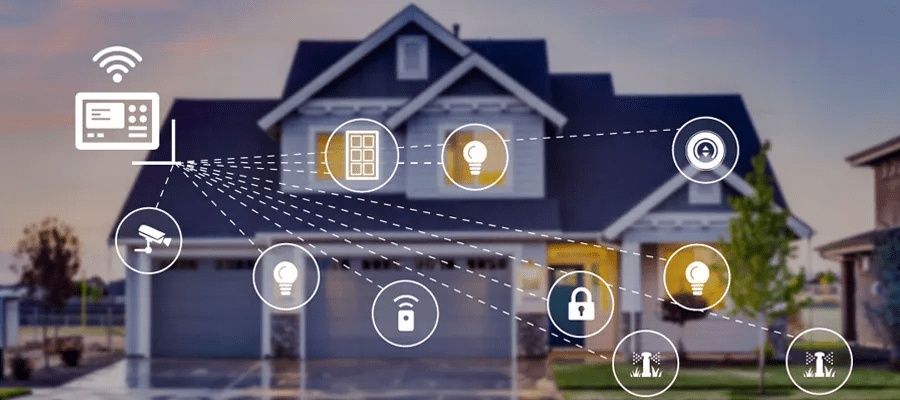
Smart home hubs are central devices that connect and manage multiple smart home systems within a single environment. They act as a control point where different IoT home devices such as lights, thermostats, cameras, and sensors can communicate with each other. The idea of a home automation hub developed as more connected devices entered households, creating a need for a unified control system.
Earlier, smart devices often worked independently, requiring separate apps and controls. This created complexity for users. Smart home hubs were introduced to simplify this experience by allowing smart home devices integration through one interface. Today, smart home control systems are designed to make everyday living more organized and efficient.
Understanding home automation basics helps explain how these systems function and why they are becoming more common in modern homes.
Importance
Smart home hubs are important because they simplify the management of multiple connected devices. As more households adopt smart home systems, the need for centralized control becomes more relevant.
These systems help address common challenges such as managing different apps, ensuring device compatibility, and maintaining consistent control. A home automation hub reduces complexity by bringing various devices together under one system.
The importance of smart home connectivity can be seen in daily use:
- Convenience: allows control of multiple devices from a single interface
- Coordination: enables devices to work together through automation rules
- Accessibility: simplifies control through voice or mobile interfaces
- Efficiency: helps manage routines such as lighting and temperature adjustments
These factors make smart hub features useful for both basic and advanced home setups.
Types of Smart Home Hubs
Different types of smart home hubs are designed based on connectivity methods and system compatibility.
Cloud-Based Hubs
These hubs operate through internet-based systems. They connect devices using online platforms and allow remote access from different locations.
Local Hubs
Local hubs process data within the home network. They are often used for faster response times and reduced reliance on internet connectivity.
Hybrid Hubs
Hybrid hubs combine both cloud and local processing. They provide flexibility by supporting remote access along with local control.
Voice-Controlled Hubs
Some hubs are integrated with voice systems, allowing users to control smart home devices using spoken commands.
Smart Hub Features
Smart hub features define how effectively a system manages connected devices.
Device Compatibility
A hub should support a wide range of IoT home devices, including lighting, security systems, and appliances.
Automation Capabilities
Automation allows devices to perform actions based on conditions or schedules. For example, lights can turn on automatically at a certain time.
Centralized Control
Smart home control systems provide a single interface for managing multiple devices, reducing the need for separate controls.
Connectivity Support
Hubs often support multiple communication protocols such as Wi-Fi, Bluetooth, and other wireless standards to ensure smooth smart home connectivity.
Smart Home Hub Setup
Setting up a smart home hub involves a series of steps that ensure proper device integration.
Initial Setup
The setup process begins with connecting the hub to a power source and linking it to a home network. This creates the foundation for device communication.
Device Integration
Devices are added to the hub through pairing processes. Smart home devices integration allows them to be controlled from a single platform.
Configuration
Users can create automation rules and adjust settings according to preferences. This step defines how devices interact with each other.
Testing and Adjustment
After setup, the system is tested to ensure all devices function correctly. Adjustments may be made to improve performance and reliability.
Comparison of Smart Home Hub Types
| Hub Type | Connectivity Method | Control Style | Usage Scenario |
|---|---|---|---|
| Cloud-Based | Internet | Remote access | Multi-location control |
| Local | Internal network | On-site control | Stable, offline operation |
| Hybrid | Internet + local | Flexible control | Mixed environments |
| Voice-Controlled | Voice + app | Hands-free control | Everyday convenience |
Recent Updates
Smart home systems have seen rapid development with improved compatibility and smarter automation features. One major trend is the increasing standardization of smart home connectivity, allowing devices from different manufacturers to work together more easily.
Another development is the integration of artificial intelligence into smart hub features. These systems can learn user behavior and adjust automation settings accordingly.
Privacy and data control have also become important topics. Many smart home hubs now include settings that allow users to manage data sharing and device permissions more carefully.
Laws or Policies
Smart home hubs and IoT home devices are influenced by regulations related to data privacy, electronic standards, and communication protocols.
Data Protection
Smart home systems often collect user data. Regulations may require transparency in how this data is stored and used.
Device Standards
Manufacturers must follow technical standards to ensure compatibility and safety of smart home control systems.
Network Compliance
Wireless communication used in smart home connectivity must comply with national communication guidelines.
These policies help ensure that smart home hubs operate safely and responsibly.
Tools and Resources
Several tools and resources support the effective use of smart home hubs.
Setup Applications
Mobile apps help guide users through smart home hub setup and device integration processes.
Compatibility Check Tools
These tools help identify whether specific IoT home devices can connect with a particular hub.
Automation Builders
Automation tools allow users to create routines and rules for smart home systems.
Monitoring Dashboards
Dashboards provide insights into device activity, connectivity status, and system performance.
These resources help users manage smart home control systems efficiently.
FAQs
What are smart home hubs and how do they work?
Smart home hubs are central devices that connect and manage multiple smart home systems. They allow different devices to communicate and be controlled from one platform.
What is involved in a smart home hub setup?
A smart home hub setup includes connecting the hub to a network, adding devices, configuring automation rules, and testing system performance.
How do smart home hubs support smart home devices integration?
Smart home hubs support smart home devices integration by using common communication protocols that allow devices to connect and interact within one system.
What are key smart hub features to understand?
Key smart hub features include device compatibility, automation capabilities, centralized control, and support for multiple connectivity methods.
Why is smart home connectivity important?
Smart home connectivity ensures that devices communicate effectively, enabling automation and smooth operation within smart home systems.
Conclusion
Smart home hubs play a central role in managing connected devices within modern households. They simplify control, improve coordination, and support automation across different systems. Understanding smart hub features and setup processes helps users make sense of how these systems function. As technology continues to evolve, smart home systems are becoming more integrated and adaptable to everyday needs.